
TM SIM Registration
The SIM registration becomes necessary to activate the TM SIM for calls and internet. To register TM SIM online, you can use the TM Portal and GlobeOne app. Complete the TM SIM registration and enjoy a seamless connection.
Note
The process of SIM card registration TM is almost the same for all, including Filipinos, tourists, corporations, and minors. However, requirements and IDs vary in each case.
How to register the TM SIM?
Globe Telecom offers three methods for prepaid TM SIM registration, including both online and physical registration. Below is a simple, step-by-step guide for each method to help you register SIM card TM easily and quickly.
SIM Registration TM Via Portal
The online TM SIM registration process via the Globe portal is straightforward. Follow the step-by-step tutorial below to complete your registration.
1
Access the Registration Portal
- First of all, go to the official TM SIM registration portal or click on the legitimate Globe SIM registration button provided above.
- You can also access the TM SIM registration portal using a QR code. Simply scan the QR code given below, and you will be automatically redirected to the official website.

2
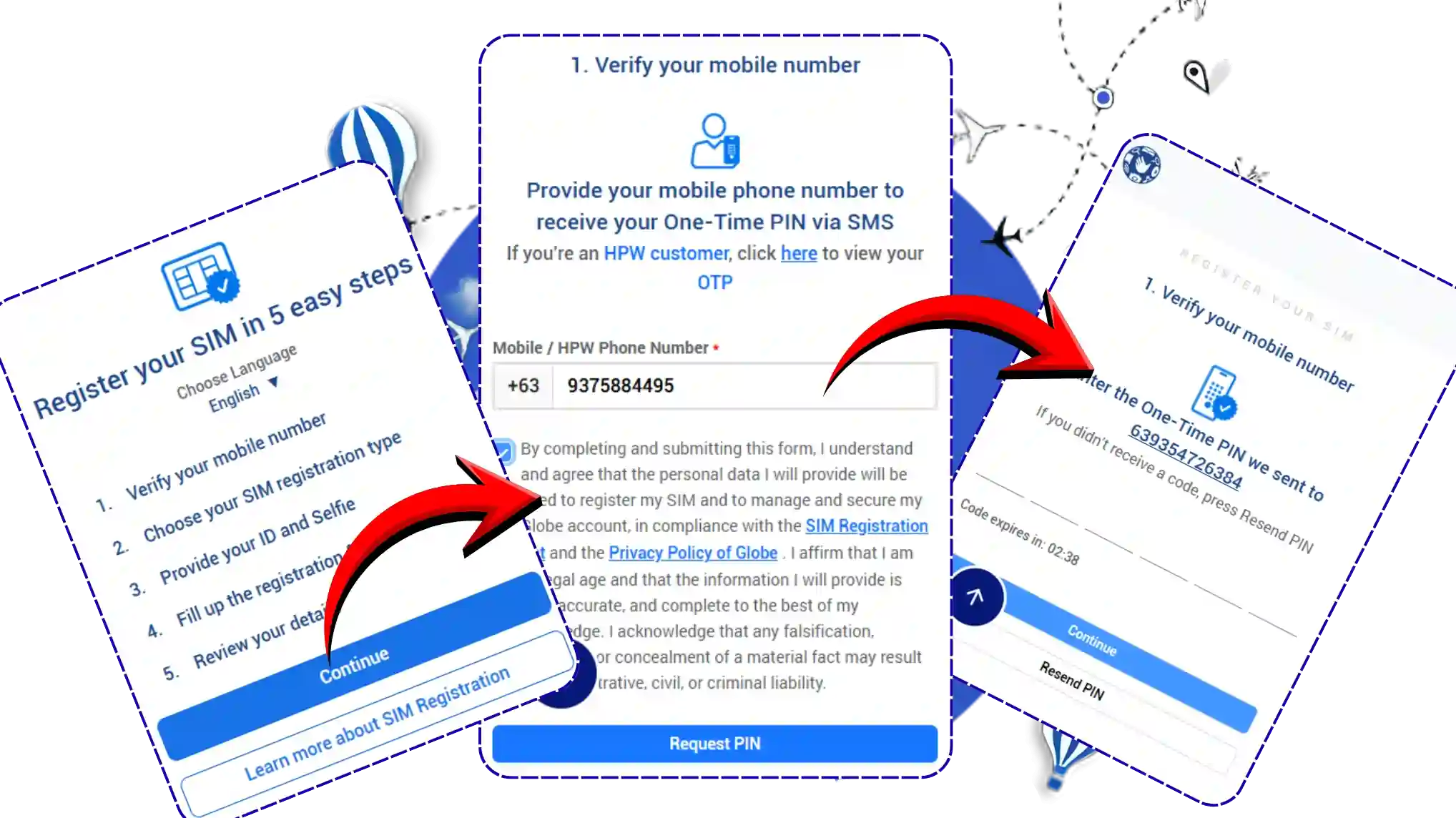
Start the TM SIM Registration Process
- Click on it and then select “Continue” to proceed.
- Now, enter your TM mobile number in the required field.
- Tick the confirmation checkbox and click on the “Request PIN” button.
- You will receive an OTP (One-Time Password) on your mobile number.
- Before requesting a new OTP, make sure to check your spam or message filter folder.
3
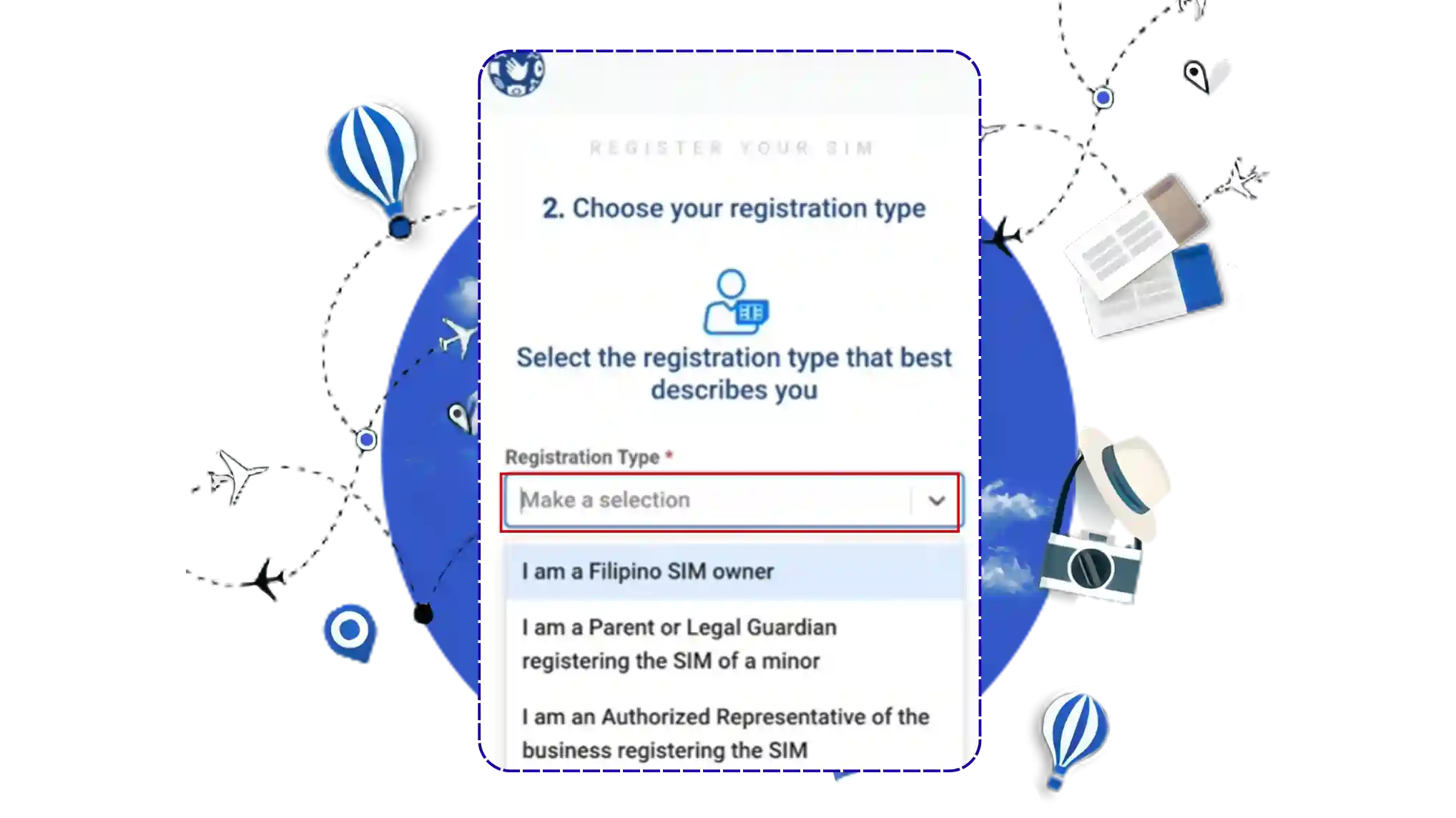
Select Your Registration Type
- Choose the appropriate registration type from the available options:
- I am a Filipino SIM owner
- I am a Parent or Legal Guardian registering the SIM of a minor
- I am an Authorized Representative of a business registering the SIM
4
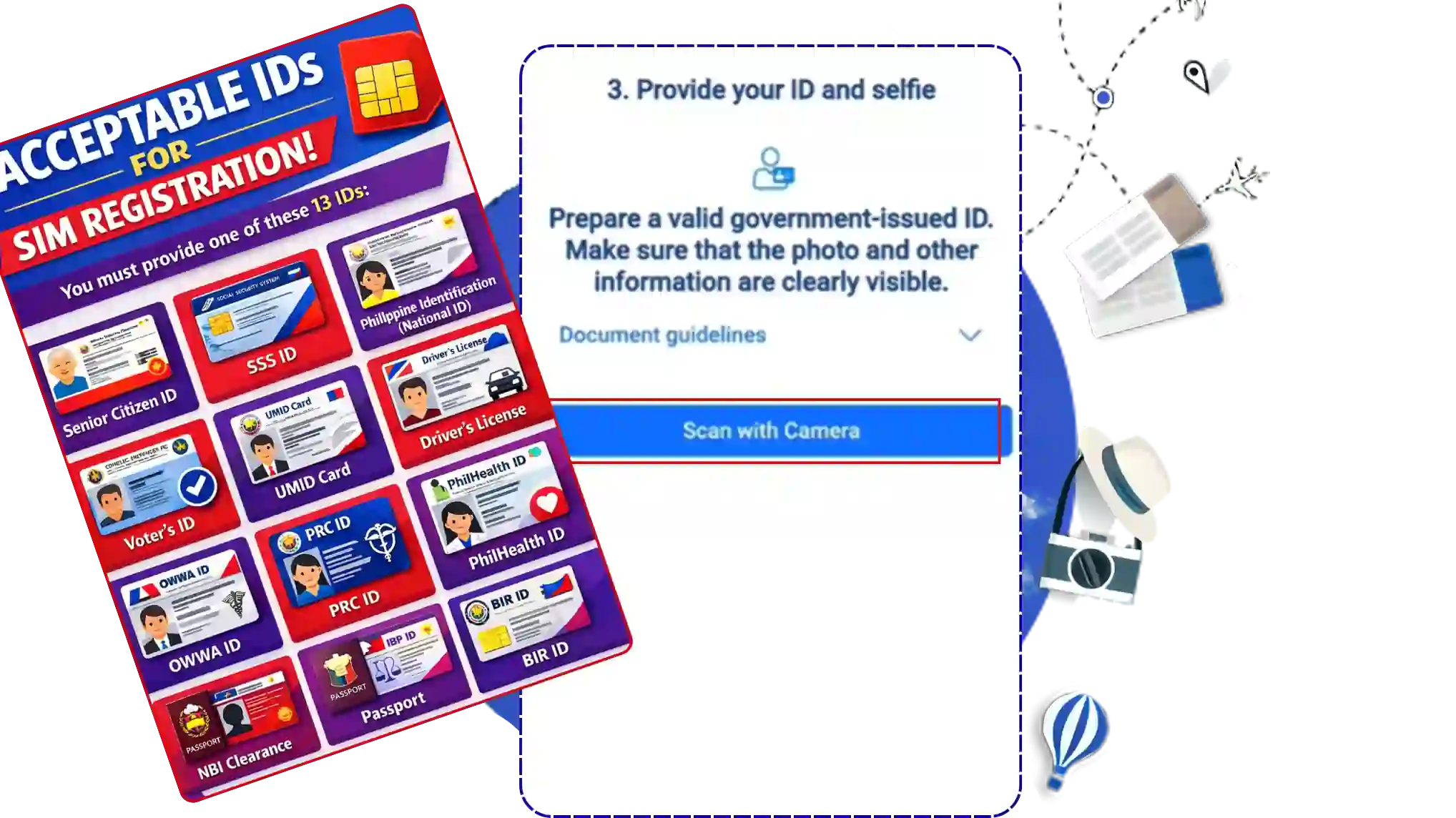
Upload a Valid ID
- Select your ID type from the list of acceptable government-issued IDs.
- Upload a clear photo of your ID, making sure:
- File size does not exceed 2MB
- All details are clearly visible sure to check your spam or message filter folder.
5
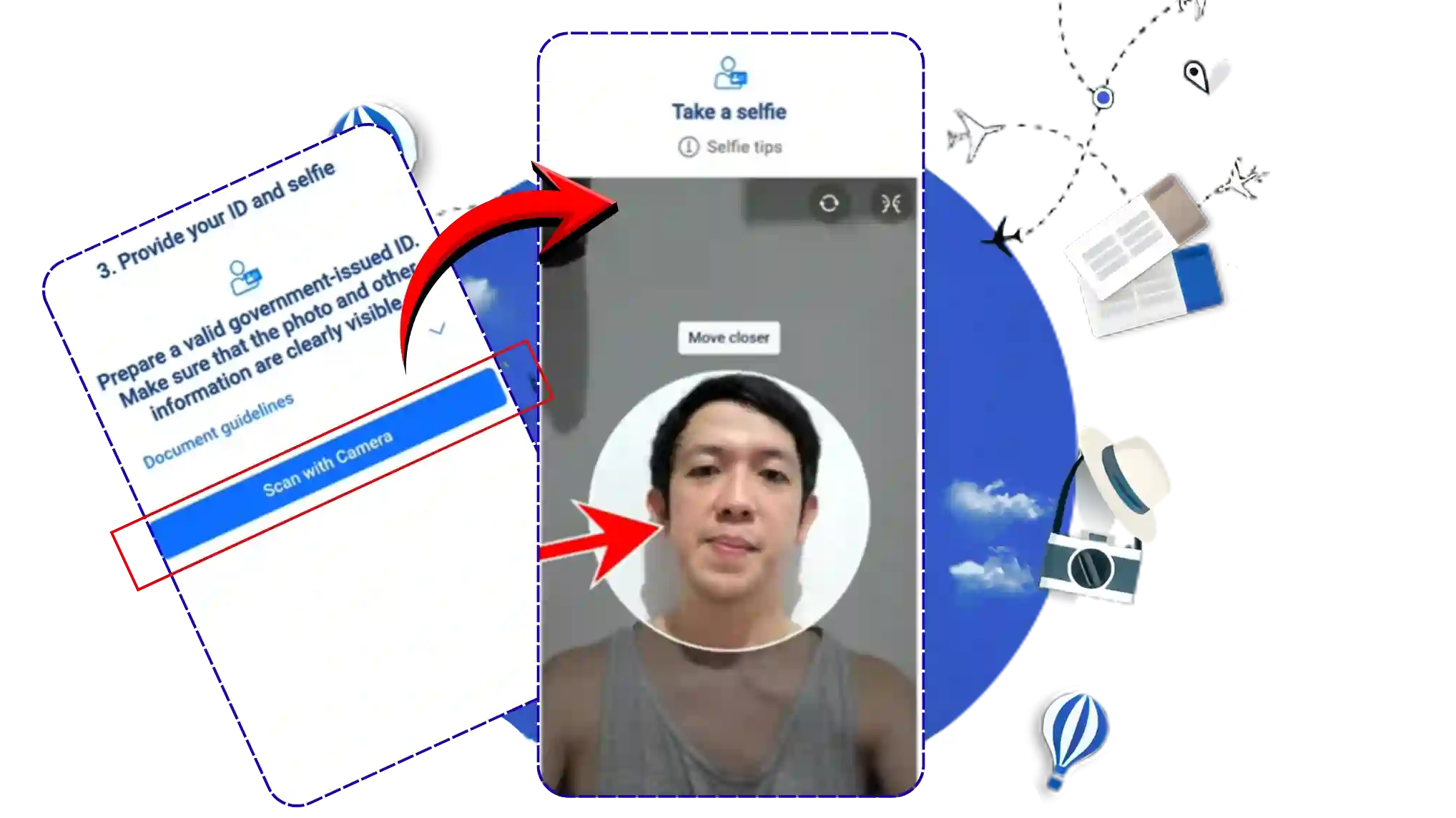
Take a Selfie for Verification
- Next, take a selfie for identity verification.
- Ensure that:
- Your entire face is clearly visible
- No filters or effects are used
- Lighting is sufficient
6
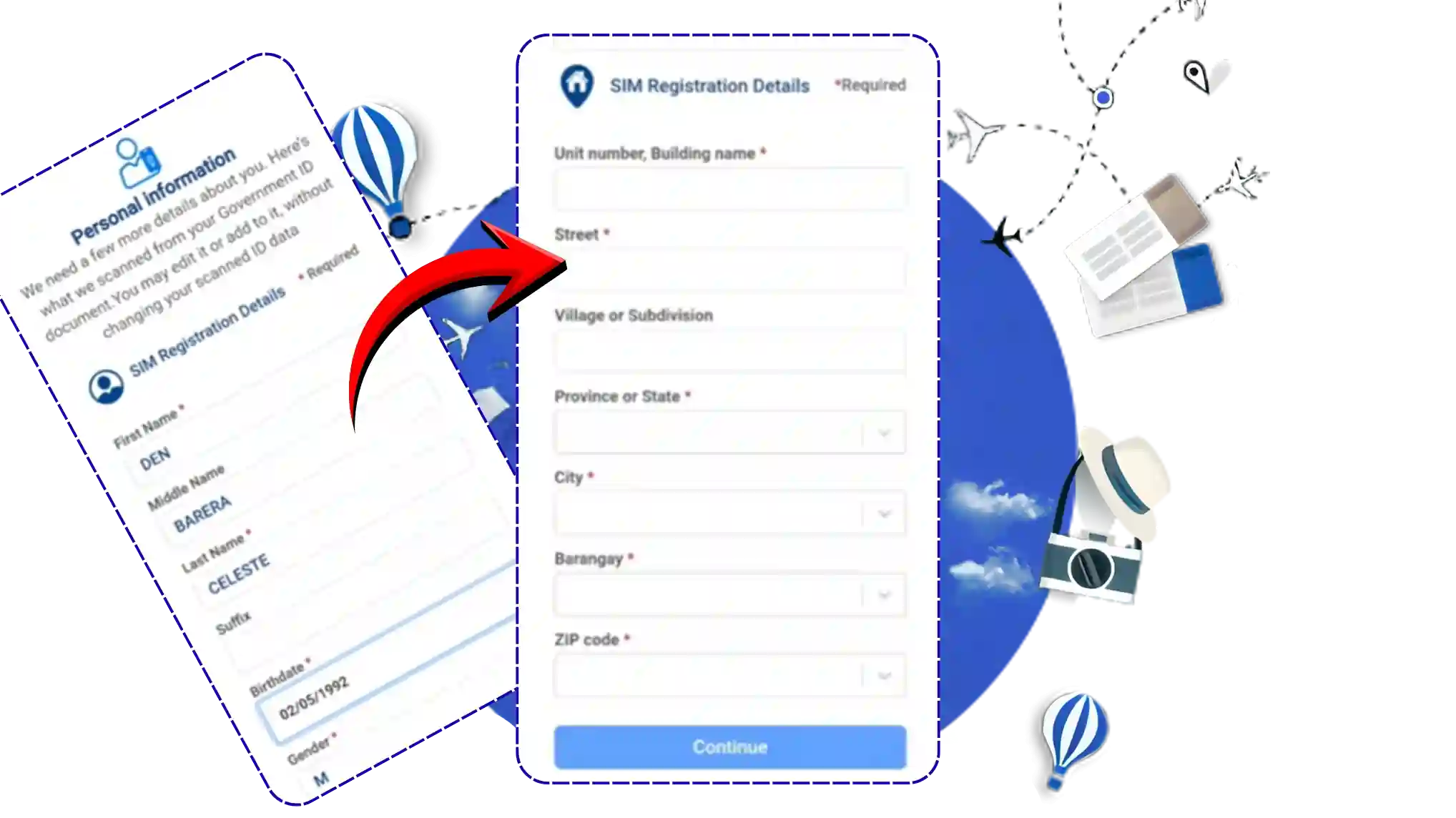
Fill Out the TM SIM Registration Form
- After that, the TM SIM registration form will appear.
- Fill in all the required details carefully and ensure the information matches your official documents.
- Once done, click “Continue.”
7
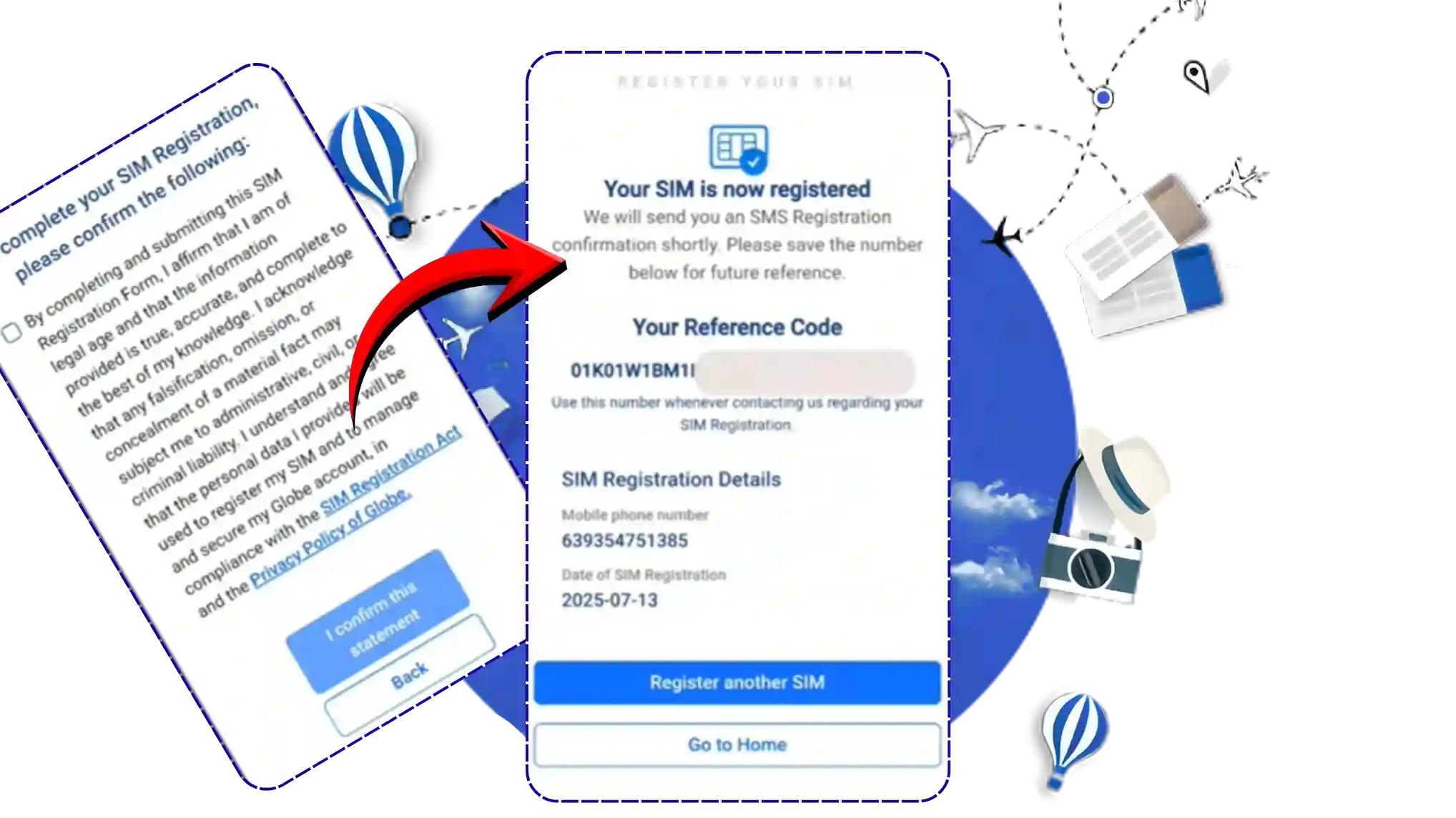
Review & Save Your Reference Number
- You will see a summary of the information you provided.
- Double-check all details carefully, then click “I confirm this statement.”
- A reference number will be generated after submission.
- Take a screenshot of this number and keep it as proof of registration.
TM SIM Registration Via GlobeOne App
The process to register a SIM card TM through the app is very similar to using the portal. Below is a clear, step-by-step guide to help you with it:
- Download the GlobeOne app on your mobile phone.
- Create an account and log in to it.
- Once logged in, you will get the “register your SIM” option on the homescreen. Click on that option.
- Enter your TM SIM number in the box, accept policies, and click on “next”.
- You will receive an OTP on your mobile number. Enter the OTP and verify your number.
- Now you will get a registration form. Fill the form carefully according to your official documents.
- Next, select the ID you want to upload, click the “attach” option to select the ID, and upload it.
- Take a selfie of your face for face verification. Ensure that the selfie is clear and your whole face is visible.
- Click on the “submit” button to submit your application. You will get a reference number on successful submission.
Register Physically In Globe Stores
If online registration isn’t comfortable for you, you can always go to a Globe store and register your SIM there. You’ll get personal help to make the process easy and quick.
- Visit your nearest Globe store and bring your SIM card and ID along with you.
- Ask the attendant there for SIM registration.
- You will be asked to provide some personal details and ID. Cooperate with the staff and provide all the requirements.
Congratulations! 🎉
Your TM SIM has been successfully registered. The SIM will be automatically activated within a few hours.
If you want to register more SIMs, simply click on “Register Another SIM.”
Note: The three methods mentioned above are the only official ways to register your SIM card. There are no other options, including using a TM SIM registration number, to complete your registration. You can choose any of the above methods for SIM registration TM Globe. All the methods are 100% free of cost.
TM SIM Registration Rewards
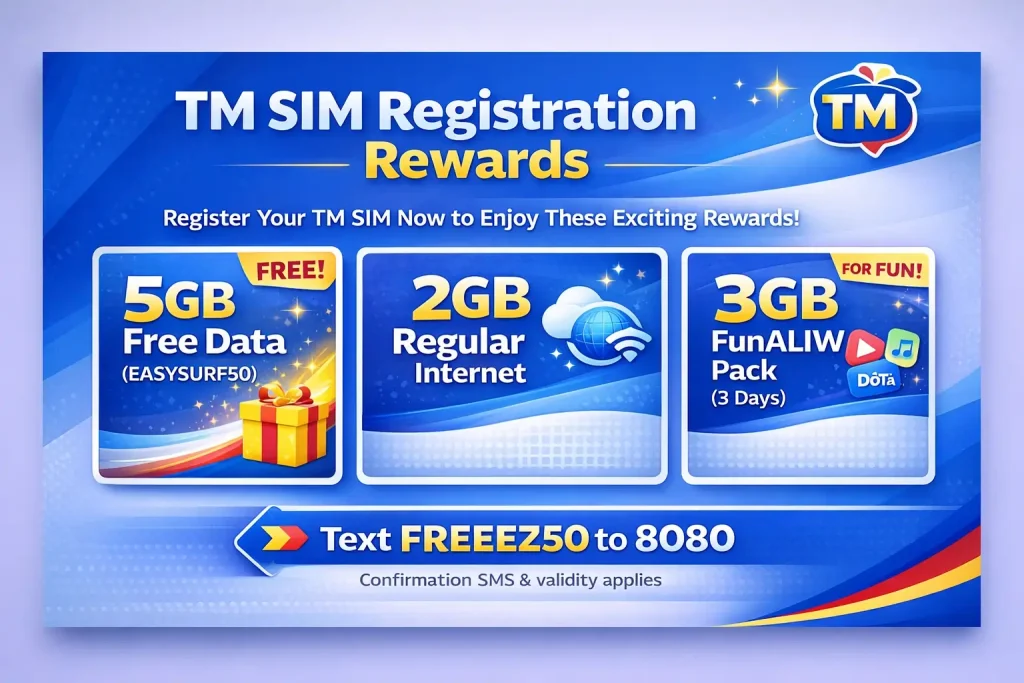
Globe Telecom permits the SIM registration act and therefore provides certain bonuses and rewards on successful TM SIM card registration. Here is the list of rewards and the step-by-step details to claim them:
- Get 5GB freebies with EASYSURF50 Rewards.
- Enjoy 2GB of regular internet data.
- Receive a 3GB FunALIW Pack valid for three days.
To avail these rewards, text “FREEEZ50” and send it to 8080. You will get a confirmation SMS and the expiry period of the rewards.
Best Registration Method
Below is a quick comparison of each registration method that would help you to choose the perfect method for you.
1. TM SIM Registration Link (Portal)
Available Hours: 24/7 online access
Speed: Instant to a few hours
Convenience: Register anytime, anywhere
Required Documents: Valid ID upload, selfie verification
Best For: Users comfortable with online forms
2. SIM Register TM via GlobeOne App
Available Hours: 24/7 app access
Speed: Instant to a few hours
Convenience: Easy navigation, app notifications
Required Documents: Valid ID upload, selfie verification
Best For: Mobile users who prefer app convenience
3. Physical Globe Store
Available Hours: Store hours (usually 9 AM – 6 PM)
Speed: Depends on queue and processing
Convenience: In-person assistance, no internet needed
Required Documents: Physical ID presentation
Best For: Users needing personal assistance or no online access
How To Check TM Registration Status?
After completing the TM SIM registration, you can check whether your SIM is registered or not.
Here are the methods that you can use to verify your registration:
1. Check Via GlobeOne App
Here is how to check your registration status online via the TM SIM app:
- Open the GlobeOne app and log in to your account.
- On the homescreen, check the registration badge next to your mobile number.
- If you get a “registered” badge, your SIM is registered. If not, the registration is still pending.
2. Check Via Portal
Here is how to check online via the Globe SIM portal:
- Visit the Globe portal and enter your mobile number in the field on the home screen that is designated for this purpose.
- You will receive an SMS “your SIM is registered”.
3. Check Via TM SIM Card Registration Number
Here is how to verify registration through a phone call:
- Call the TM helpline at “808” and ask for TM SIM registration verification.
- You will be asked to provide some details for verification.
- The helpline checks and verifies your status.
4. Check Physically In Globe Stores
If none of the methods mentioned earlier work for you, simply visit a Globe store for verification. Ask the attendant there to check your registration status. You will be asked to provide some personal details, so make sure to provide all the required information accurately. You will get the status after a short verification.
Acceptable IDS
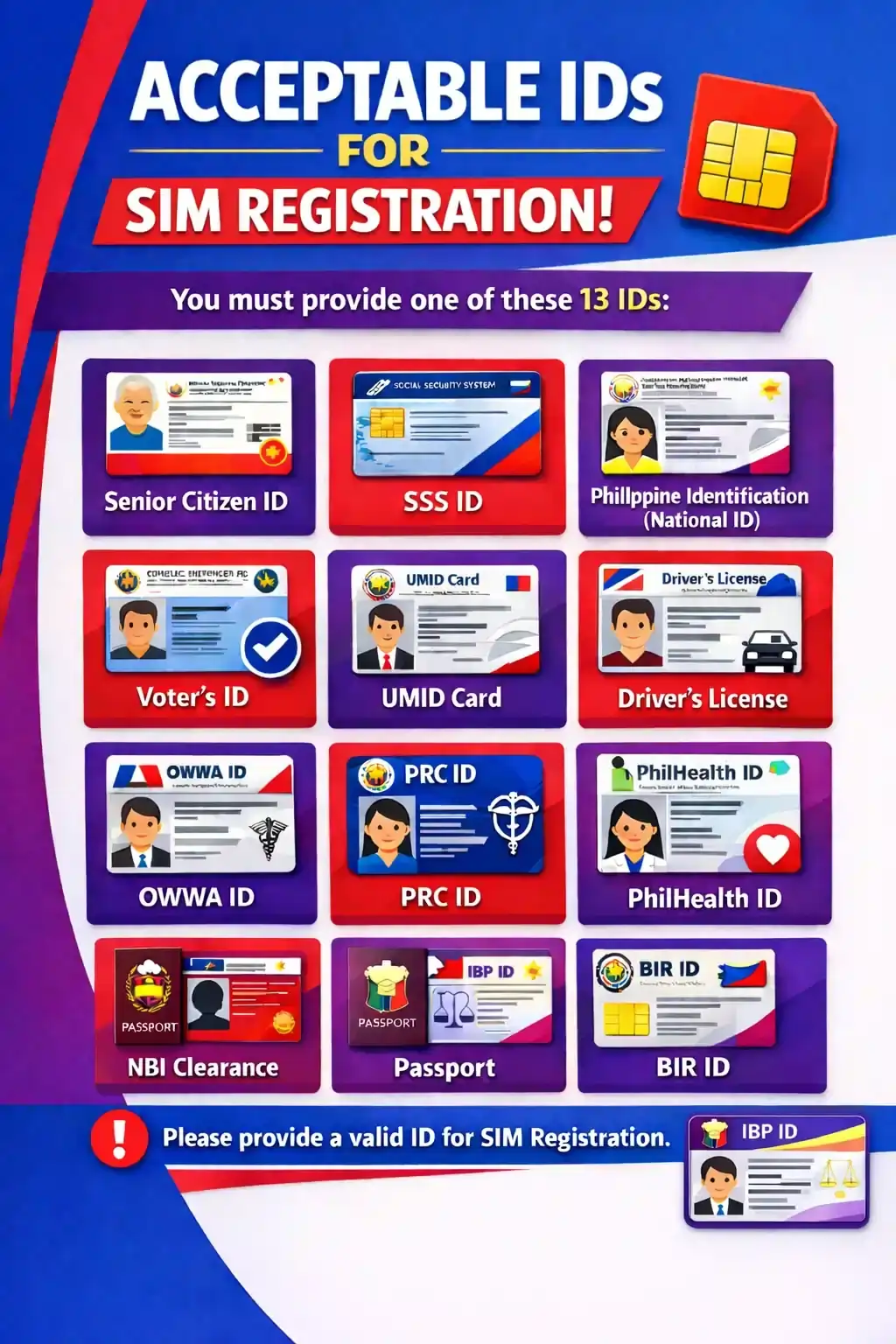
Here is the list of acceptable IDs for SIM registration. You must provide one of these IDs:
- Senior Citizen ID
- SSS ID
- Philippine Identification (National ID)
- Voter’s ID
- UMID Card
- Driver’s License
- OWWA ID
- PRC ID
- Philhealth ID
- NBI Clearance
- Passport
- IBP ID
- BIR ID
Requirements For SIM Registration TM?
To register your TM SIM successfully, you must fulfill a few important requirements. Here’s a complete list to help you complete your TM SIM registration smoothly and without any hassle.
Philippine Citizens
Filipino citizens must fulfill the following requirements:
- Government ID with picture and ID number
- Phone Number
- Full Name
- Address
- Gender
- Birthday
- Proof that all information is correct
Note
The minors can register SIM with the details and documents of their guardian.
Companies
Here is the list of requirements for companies:
- Full Name of the Authorized Representative
- List of Mobile Numbers for Registration
- Company or Organization Name
- Complete Company Address
- Proof of Business Registration
Foreigners
Foreign nationals have different requirements depending on whether they are tourists or working residents:
For Tourists
- Name (Accurate)
- Gender
- Birthday
- Address
- Mobile Number
- Philippine address proof
- Passport copy. Bio page and Visa Page
- Onward or Return ticket with dates and time
Note
The SIM registered for tourists remains valid for 30 days, and it will be automatically deactivated after a month. You need to register again to use it more.
Foreign Residents
- Name (Full Accurate Name)
- Mobile Number
- Gender
- Birthday
- Philippine Address Proof
- Passport (both Visa Page and Bio Page)
- ID from Visa-Granting Authority
- Travel Document from the Department of Justice
- Alien Certificate of Registration ID (ACRI)
- Embassy Documents (if applicable)
How To Update Details
You can change your ID and personal information linked to your TM SIM anytime you want. Here is how to do it:
- Open the TM SIM app and log in to your account using your login details.
- Once logged in, you will get the “update your information” option. You can simply find this option by searching.
- Now you will get an option to make changes and update your ID and information. Make the changes according to your preference.
- Complete the verification and click “submit” once done.
- Your data will be updated after a while.
How To Switch To TM?
If you want to switch to TM (Touch Mobile) from any other network in the Philippines, such as Smart, TNT, etc., you can easily do so through the mobile network provider’s portability process. This allows you to keep your current number while changing your network seamlessly.
Here is the step-by-step guide that would help you switch to TM from any other network:
Note: Before starting, ensure that your current number is active, has no unpaid bills, and has been active for at least 90 days.
- Send a text USC to 5050 from your current number. You will receive a 9-digit code in reply.
- Visit the nearest Globe store to request a new TM SIM for porting. Don’t forget to bring your SIM and 9-digit code with you.
- You will be asked to provide your current number and the 9-digit USC code. Provide the required things when asked.
- The new TM SIM will be delivered to you within 2-3 days.
- Insert the TM SIM into your phone.
- Once inserted, go to the SIM menu, select “Port In” and then “Online Request.”
- Enter your old mobile number and the 6-digit porting code sent by TM.
- Wait a few hours for your SIM activation. Once activated, you can use the TM network with your old number.
In this way, you will get TM services with your old number. Keep in mind that the process is free of cost and there are no service charges for it.
Troubleshooting The Common Registration Errors
Sometimes, a common issue occurs that can fail the SIM TM registration. These issues might be due to users’ mistakes or sometimes technical issues on the system end. Below, I have discussed the reasons along with the working solutions of these issues:
Not Getting OTP
OTP is the most common issue that occurs during SIM registration. This issue is mostly due to users’ mistakes. However, you can easily overcome it by taking these simple steps:
- Double-check and ensure that you have entered the correct phone number.
- Check that your phone has a stable network connection and that the SIM card is properly placed.
- Check the spam box of your inbox. In some cases, the system considers OTP as spam and sends it to the spam folder.
ID rejected
The system denies the ID and fails the verification. Here are some precautions that would help you to verify your ID successfully.
- Make sure that your ID is official and up to date.
- The file size of the ID is not greater than 2MB.
- Your ID must be clear. The holder’s signature and photo are clear and visible.
Selfie Issue
Selfie verification is one of the most important steps for registration, and registration will not be completed without it. Here is how you can verify your face and overcome all the issues related to it:
- Always capture a selfie of your whole face.
- Avoid using any filters and effects on your face.
- Do not wear any kind of cap, hat, or other such thing.
App or Portal Not Working
This is a rare issue and mostly occurs due to technical issues. Here are the measures that you should follow in such situations:
- Check that your device is connected to a stable internet connection. If not, try moving to a better network.
- Always use the latest version of the app. Update the app as soon as a new version arrives.
SIM card already registered
This issue is mostly from the system end and is easy to resolve.
- Check the gain and ensure that the number you entered is correct. Sometimes, this issue occurs when you accidentally enter the incorrect number that is already registered.
- If the number is correct, contact the Globe helpline and report your issue. The helpline would provide you with a solution.
Registration Time Out
It happens when you take too much time to take the next step. This is not a big issue, and you need no worry about it. Just follow these given steps to avoid the “Time out” issue.
- Always take your next move as soon as you complete the current step.
- In rare cases, this issue occurs when you are not connected to a good network. So always connect your device to a stable internet connection.
Above, I have provided all working solutions to all the possible registration issues. However, if you are stuck at any stage, contact the Globe helpline or visit the Globe stores for assistance.
Tips For Hassle-Free Registration
As a Globe SIM user for many years, I have experienced SIM registration several times and learned some valuable tips to ensure a smooth process. You must follow these for a successful SIM registration:
- Always enter the correct mobile number. Double-check the number and ensure its accuracy.
- Take a clear, well-lit selfie without filters for smooth facial verification.
- Upload a clear photo of acceptable ID. Make sure that the ID is official, up to date, and the user’s signature is clearly visible.
- Always connect with a stable internet connection while registering. It would help you to receive OTP successfully and verify your details easily. In short, stable intent is necessary for smooth and successful registration.
- Save or screenshot your reference number after registration as proof and for any follow-up inquiries.
- If you encounter any kind of issue, feel free to contact the Globe TM helpline.
Helpline Details
Globe Telecom offers professional support to the TM and Globe SIM users. You can contact the helpline anytime in case of any issue. The support team would take action on your issue and provide a possible solution to your issue:
Social Media
Globe Telecom has official social media pages through which you can contact online to get support.
Facebook: https://www.facebook.com/globeph/
Messenger: https://www.tmtambayan.ph/contact-facebook-messenger
Hotline Numbers
(02) 7730-1500 and 808
Both lines are available daily from 8:00 AM to 8:00 PM
Globe Stores
If you want in-person assistance, visit the Globe stores and report your issue. The attendant there will assist you and provide a solution to your issue.
Frequently asked questions
Conclusion
TM SIM registration is essential to activate your SIM for calls and internet in the Philippines. You can easily register your SIM online via the official TM portal or GlobeOne app. If you are not comfortable with online registration, visit a Globe store for in-person assistance.
The SIM registration TM requires a valid government-issued ID, a clear selfie, and your TM mobile number. Always provide a valid and up-to-date ID for successful registration.
The registration is free and does not require any charges. Instead, the TM provides several rewards for successful registration. If you encounter any issues while registering, contact the TM helpline for assistance.
Get the GlobeOne App!